
Localization
The yuuvis shell provides a complete localization system that covers translation extraction from source code, aggregation of translations from multiple libraries, and runtime language switching per user. Every shell library ships its own translation files, and a client project’s build tooling merges them into a single set of files that the application loads at startup.
Technology Foundation
Section titled “Technology Foundation”Localization in the yuuvis shell is built on @ngx-translate/core. The @yuuvis/client-core library configures and bootstraps @ngx-translate as part of provideYuvClientCore(), and re-exports its most commonly used symbols so that app and library code only needs to import from @yuuvis/client-core:
// Import from @yuuvis/client-core — do NOT import directly from @ngx-translate/coreimport { TranslateModule, TranslatePipe, TranslateService, TranslateDirective, TranslateLoader,} from '@yuuvis/client-core';This single import point ensures that all parts of a client project use the same @ngx-translate instance and configuration.
Architecture
Section titled “Architecture”Translations in a shell client project come from two distinct sources:
- External libraries — every
@yuuvis/*package published to npm ships its own per-language JSON files insidelib/assets/i18n/. - Local code — the client application itself and any locally developed apps (in
projects/) each have their ownsrc/assets/i18n/folders.
Before the application starts, the client project’s build tooling collects all these individual files and merges them into a single consolidated translation file per language. At runtime, @ngx-translate loads only these merged files.
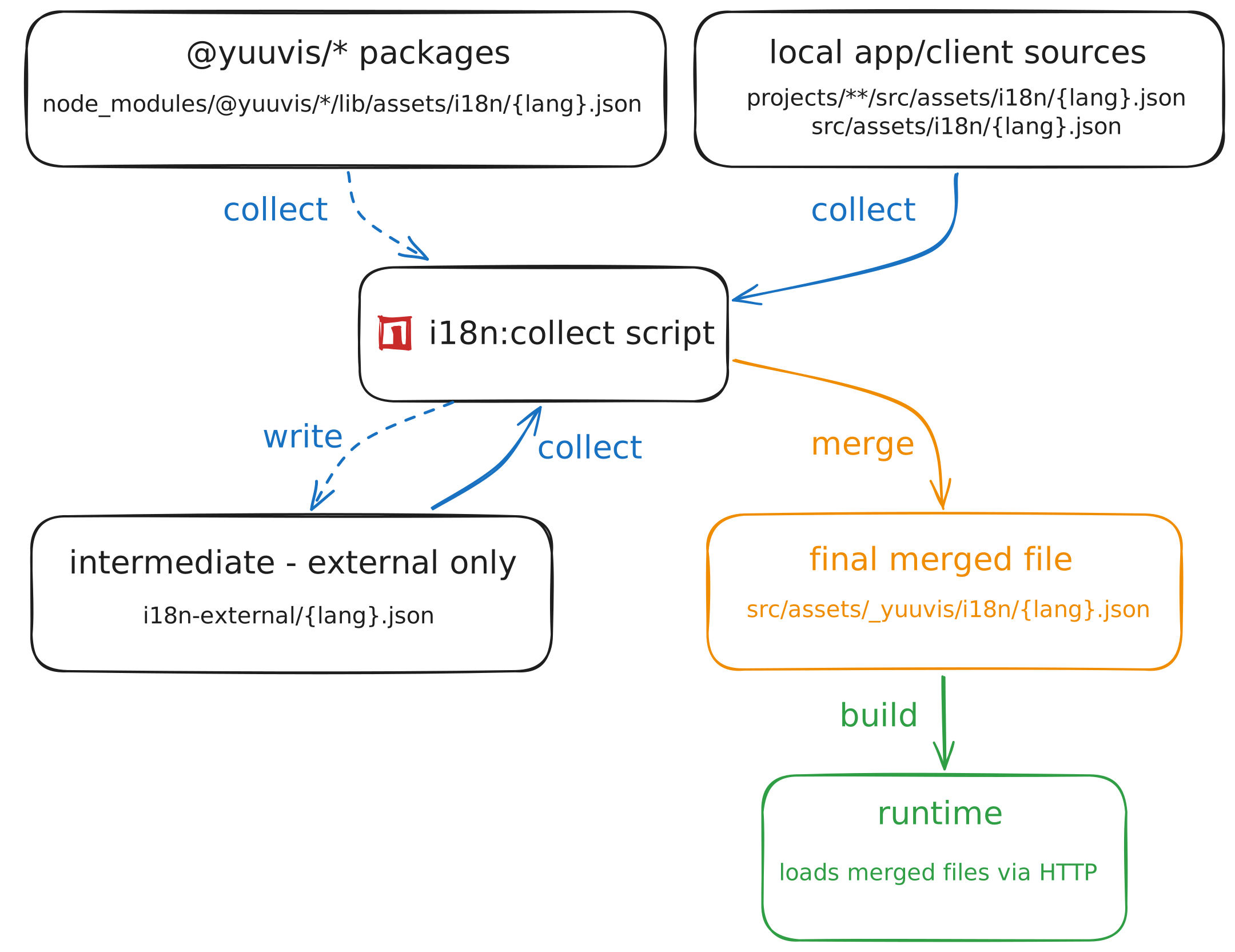
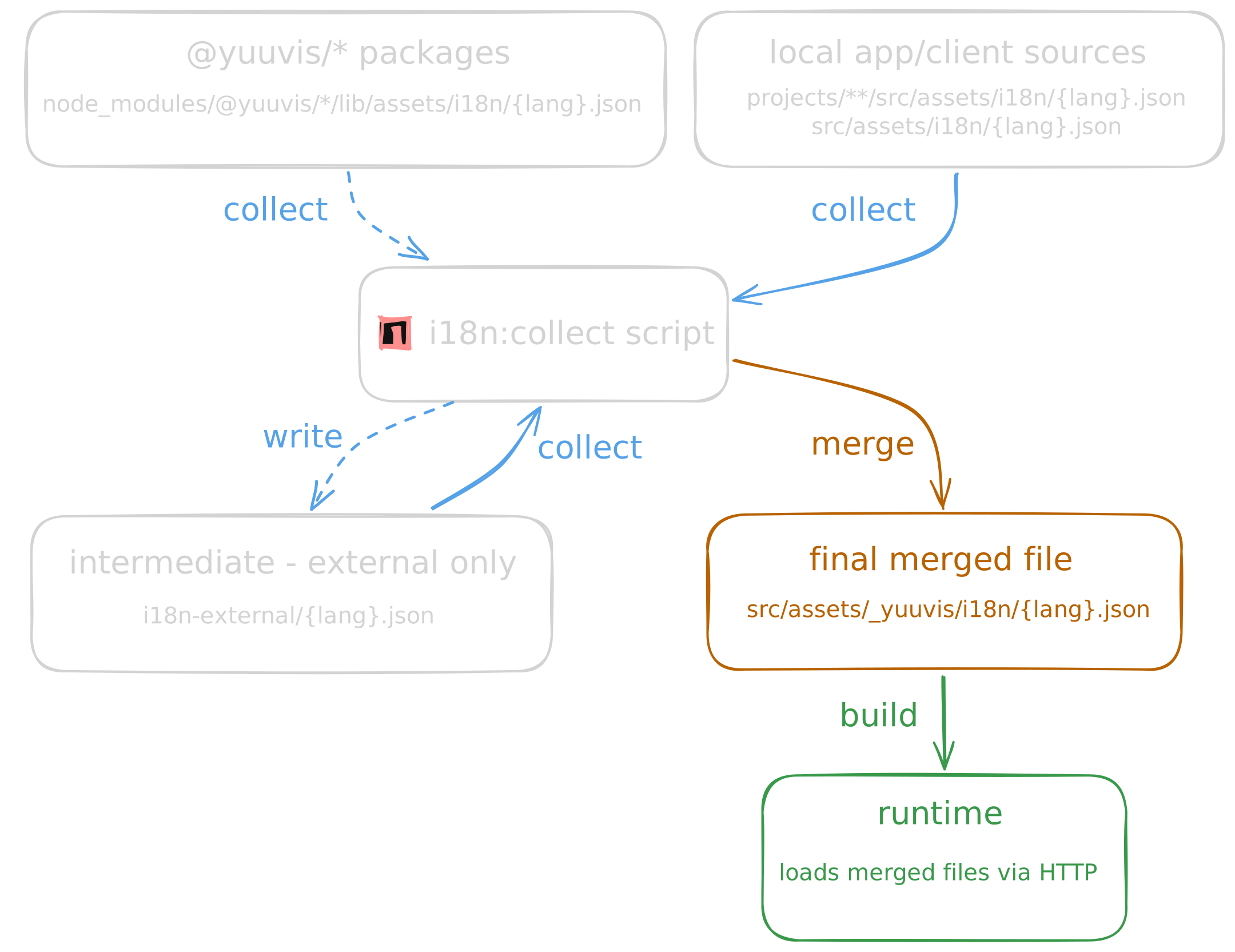
Translation file collection and merging process showing how external library translations and local app translations are aggregated into consolidated runtime files
Language Configuration
Section titled “Language Configuration”The set of languages a client supports is declared in its main configuration file at src/assets/_yuuvis/config/main.json under core.languages:
{ "core": { "languages": [ { "iso": "de", "label": "Deutsch" }, { "iso": "en", "label": "English", "fallback": true } ] }}Each entry follows the YuvConfigLanguages interface:
| Property | Type | Description |
|---|---|---|
iso | string | ISO 639-1 language code (e.g. "de", "en", "es") |
label | string | Human-readable display name shown in language selectors |
fallback | boolean | Marks this language as the fallback when a user’s preferred locale is unavailable |
The language marked as fallback: true is the one @ngx-translate uses when a translation key is missing in the active language. Exactly one language should carry this flag.
Translation Files
Section titled “Translation Files”Each library and app module stores its translations as flat JSON files — one file per language, named by ISO code:
lib/assets/i18n/├── de.json└── en.jsonTranslation keys use dot-notation with a library or feature prefix to avoid collisions across libraries:
{ "yuv.app.drive.action.copy-link": "Copy link", "yuv.app.drive.action.copy-link.description": "Copies link to clipboard.", "yuv.app.drive.create.file": "Upload file", "yuv.app.drive.create.folder": "Create folder"}Keys for locally developed apps should follow the same convention, using a company or app-specific prefix:
{ "myapp.works": "Myapp works!"}Build-time Tooling
Section titled “Build-time Tooling”Two npm scripts manage translations in a client project. They are defined in package.json and operate on the source files at build time.
i18n:extract
Section titled “i18n:extract”npm run i18n:extracti18n:extract uses @vendure/ngx-translate-extract to statically analyze your TypeScript and HTML source files. It finds all translation keys referenced via the translate pipe, the TranslateDirective, and the marker() function, then writes them into the per-language JSON files in each library and app’s src/assets/i18n/ folder.
The script reads angular.json to discover all project paths. For each library and application it finds:
- It scans the
src/folder for translation keys. - It generates or updates
src/assets/i18n/{lang}.jsonfor every language passed to the script via--lang. - Keys that no longer appear in the source are removed (
--clean). Keys are sorted alphabetically (--sort).
The languages to extract are configured in package.json:
{ "scripts": { "i18n:extract": "node ./scripts/i18n-extract.js --lang=de,en" }}Run i18n:extract whenever you add new translation keys to your source code, rename existing keys, or remove keys that are no longer used.
Marking strings for extraction
Section titled “Marking strings for extraction”The extract tool detects keys used in Angular templates automatically. For keys that appear only in TypeScript code — for example in service methods or configuration objects — wrap them with the marker() function from @colsen1991/ngx-translate-extract-marker so the extractor can find them:
import { marker } from '@colsen1991/ngx-translate-extract-marker';
// The string is statically extracted and added to the translation files.// At runtime, marker() is a no-op that just returns the string unchanged.const title = marker('myapp.dialog.title');
i18n:collect
Section titled “i18n:collect”npm run i18n:collecti18n:collect aggregates all translation files from every source into the single merged file that the application loads at runtime. It runs in two phases:
Phase 1 — Collect external library translations
The script scans every @yuuvis/* package in node_modules/ for i18n/ folders and merges all found JSON files per language into i18n-external/{lang}.json at the project root.
After merging, it uses the English file as a reference to ensure all other language files contain the same set of keys. Keys that are present in en.json but missing from another language file are added with an empty value "". This makes it easy to spot untranslated content.
Phase 2 — Merge all sources into the final output
The script then merges translations from three locations into the final output directory src/assets/_yuuvis/i18n/:
| Source | Description |
|---|---|
projects/**/src/assets/i18n/ | Locally developed apps and libraries |
src/assets/i18n/ | Client application root translations |
i18n-external/ | Merged external library translations from Phase 1 |
The resulting src/assets/_yuuvis/i18n/{lang}.json files contain all translations from all sources, sorted alphabetically. These are the only files the application loads at runtime.
i18n:collect runs automatically before npm start via the prestart hook in package.json, so you always have an up-to-date merged file during development:
{ "scripts": { "prestart": "npm run i18n:collect", "start": "ng serve --configuration development --proxy-config proxy.config.js" }}Run i18n:collect manually after updating @yuuvis/* dependencies to pick up any new or changed translations shipped with the new package versions.
Using Translations
Section titled “Using Translations”In templates
Section titled “In templates”Import TranslateModule from @yuuvis/client-core into your standalone component to get access to the translate pipe and the [translate] directive:
import { TranslateModule } from '@yuuvis/client-core';
@Component({  selector: 'lib-myapp',  imports: [TranslateModule],  template: `    <p>{{ 'myapp.welcome.message' | translate }}</p>    <button [translate]="'myapp.action.submit'"></button>  `,})export class MyappComponent {}
In TypeScript
Section titled “In TypeScript”Inject TranslateService when you need to translate strings programmatically:
import { TranslateService } from '@yuuvis/client-core';import { inject } from '@angular/core';
@Injectable({ providedIn: 'root' })export class MyappService {  private translate = inject(TranslateService);
  getLabel(): string {    // Returns the translation synchronously (returns the key if not found)    return this.translate.instant('myapp.label');  }
getLabel$(): Observable<string> { // Returns an Observable that emits whenever the active language changes return this.translate.get('myapp.label'); }}Key Management When Dependencies Update
Section titled “Key Management When Dependencies Update”When you update a @yuuvis/* library to a new version that introduces additional translation keys, i18n:collect handles the update automatically:
- The new keys from the updated library’s
i18n/folder are merged intoi18n-external/{lang}.json. - For every non-English language file in
i18n-external/, the missing keys are added with an empty value"". - The next full collect run merges everything into
src/assets/_yuuvis/i18n/.
Existing translations in i18n-external/ are never overwritten — only new keys are added. This means a library update never silently discards your translated content. The empty "" values in the language files make it straightforward to find keys that still need translation.
Adding a New Language
Section titled “Adding a New Language”To add support for a language beyond the default English and German, a one-time setup is required across the extract script, the external translation files, and the application configuration. This process is described in detail in the Adding a Language developer guide.