
Fundamentals
Our Design System provides a shared foundation for building shell applications. It eliminates the need to reinvent solutions for every project by offering a common set of rules, tokens, and components. Designers and developers work with the same language and resources – enabling seamless collaboration and reliable outcomes.
At its core, the system builds on Angular Material (version 19), the official implementation of the Material Design System in Angular.
Two elements form the backbone of our Design System:
- Tokens – the smallest building blocks, carrying semantic meaning for colors, typography, spacing, and more. They ensure that design values are applied consistently across code and Figma.
- Components – the functional and visual structures of our UI. Most come directly from Angular Material or use it as a foundation, while selected cases are extended through custom wrapper components to meet specific requirements.
The Shell Standard Theme acts as a configuration layer: it configures Material system and component tokens (theme & overrides) and links Material tokens with our Ymt Tokens to extend Material tokens where necessary. Consumer apps inherit this configuration by default, ensuring consistency across projects while still allowing controlled customization (e.g., via custom color palettes).
This layered strategy combines the strengths of Angular Material with the semantic clarity of our own tokens and the flexibility of tailored components. Together, they form the bridge between design and development.
What are Tokens?
Design tokens are the smallest named building blocks of our Design System. They capture core design values (e.g., colors, typography, spacing) and translate them into a shared language between design and development.
Instead of raw values like #0055cc or 16px, we work with semantic roles such as primary or on-primary. These roles don’t just define what a value is, but also what it is intended for.
Why Tokens?
- Connected to global theming → tokens are the link between Shell Client theming and Shell Applications. Using tokens ensures that any shell application automatically reacts to theme changes.
- Semantics instead of numeric codes → tokens express meaning and context (e.g.,
on-*= content on a surface). - Consistency → a role name stays stable, even if its concrete value changes per theme.
- Scalability → updates happen centrally, without breaking shell applications.
- Cross-tool → the same tokens are available as CSS variables in the frontend and as variables in Figma.
Token Structure
Section titled “Token Structure”Our token structure builds on Angular Material tokens but is extended and unified through the yuuvis® Standard Theme. All tokens in shell applications are consistently named under the prefix ymt-.
We distinguish between two layers:
Material System & Component Tokens
- Provided by Angular Material
- Define base palettes, typography, and component look & feel
- Configured and extended within the yuuvis® Standard Theme
Ymt Tokens (ymt-*)
- Often alias or reference Material tokens
- Extend Material with additional roles (e.g.,
spacing-*,pane-*) - Exist as CSS variables in the frontend and as text styles/variables in Figma
- Are the only tokens to be used in shell applications
- Some of them are intended to be themeable (e.g., colors)
Colors
Section titled “Colors”Our color tokens are primarily grounded in Angular Material system tokens. They inherit their structure and logic from the Angular Material design foundation.
In our system, colors are always expressed through semantic tokens. Instead of referencing raw values from a palette, we work with clearly defined roles, for example:
primary– the main interaction and surface color of an application (not necessarily the brand color)on-primary– text/icons placed on a primary surfacesurface/on-surface– backgrounds and their contentdanger,success,warning– status colors
This semantic approach ensures that tokens describe not only a color value but also its context of use.
Foundation: Color palettes in yuuvis® Standard Theme
Frontend: Provided as CSS variables (--ymt-*)
Figma: Available as Figma variables
Color Palettes
Section titled “Color Palettes”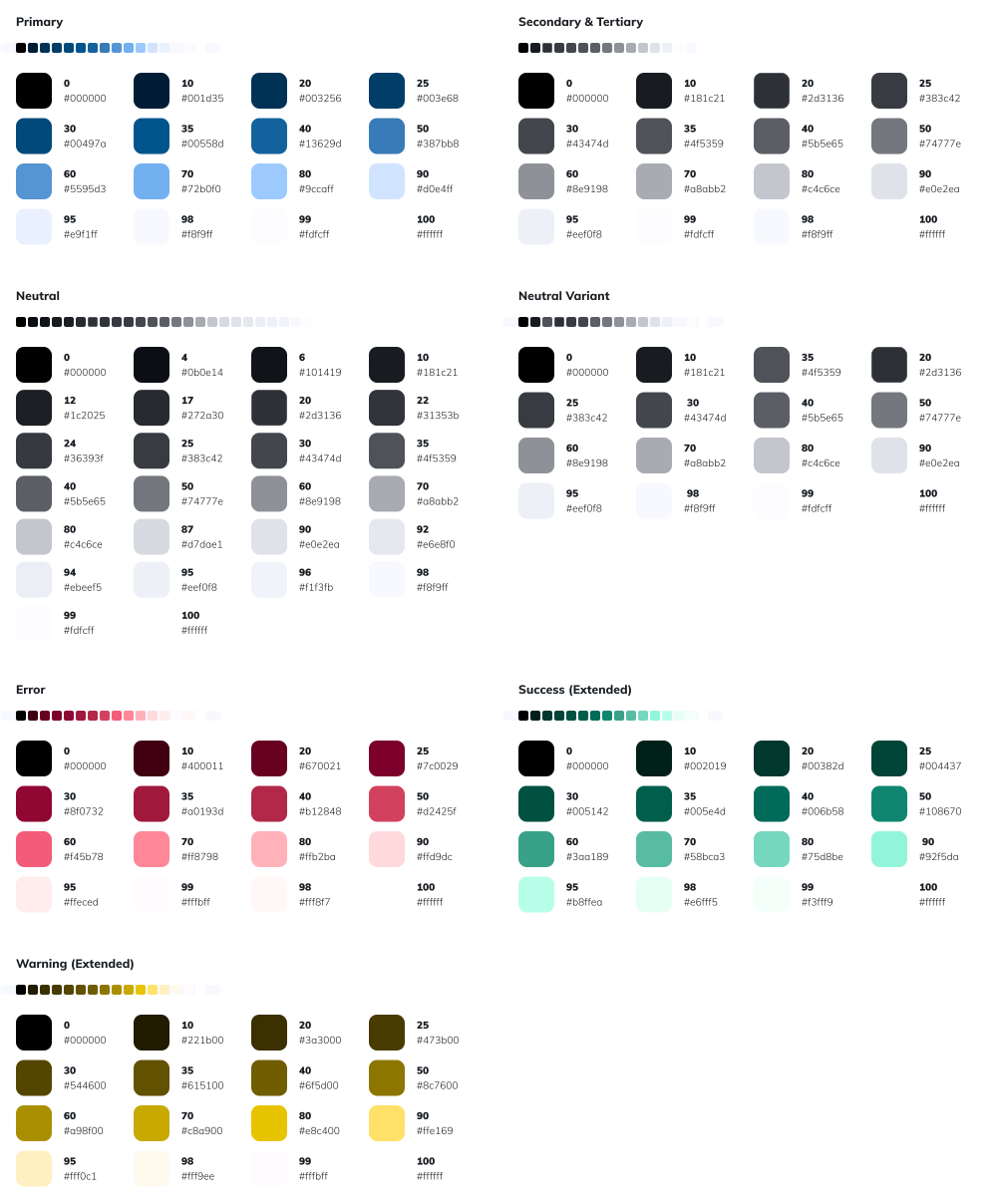
Typography
Section titled “Typography”Our typography tokens are primarily grounded in Angular Material system tokens. They inherit their structure and logic from the Angular Material design foundation.
Instead of using raw font sizes or weights, we work with semantic roles that describe where and how a format is applied, for example:
body– the default body text for general contenttitle-small/title-medium/title-large– hierarchical title levels for structuring panes and sectionstitle-smallest(custom) – very compact title style for constrained spaces
Each composite token is further backed by technical parts such as font-family, size, weight, and line height.
Foundation: Type scale in yuuvis® Standard Theme: Major Second (1.125), design base-size 14px
Frontend: Provided as CSS variables (--ymt-font-*)
Figma: Available as text styles (composite) and Figma variables (parts)
Type Scaling
Section titled “Type Scaling”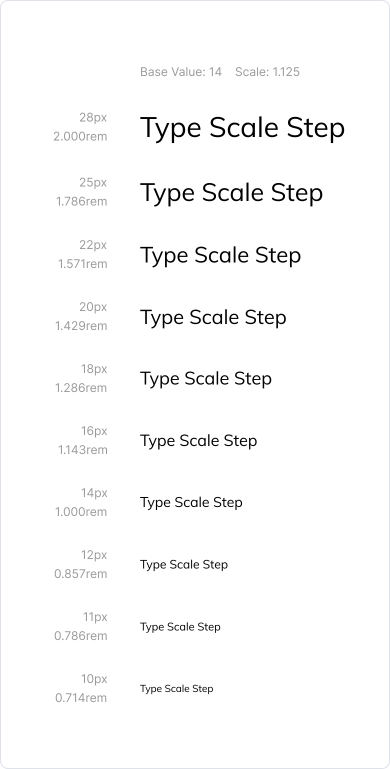
Dimensions
Section titled “Dimensions”Our dimension tokens are derived from Angular Material system tokens, but not all parts are covered by Material.
- Corner radii build directly on the Material foundation.
- Spacing and sizing are deliberate Ymt extensions, added to ensure consistent structure across applications.
Instead of applying raw pixel values, we work with semantic roles that define spatial rules for layout and components:
spacing-*– spacing tokens based on an 8px grid, extended with fine steps of 1–4px for precisionsizing-*– standardized size levels (inrem), introduced by Ymt for consistent element sizingcorner-*– corner radii XS → XL, inherited from Material
This approach guarantees both continuity with the Material foundation and flexibility through Ymt-specific additions.
Frontend: Provided as CSS variables (--ymt-*)
Figma: Available as Figma variables